What a Clipping Platform Does, and What It Does Not
A clipping platform is a place where you cut long videos into short clips and get paid for the ones a brand approves. It is not an editing app, and it is not a job board.
On this page23
A clipping platform is a place where you cut long videos into short clips and get paid for the ones a brand approves. It is not an editing app, and it is not a job board. The platform holds the campaign, the brief, and the payment, while you do the cutting. That difference matters more than it sounds, because most people searching for a clipping platform are really asking two questions at once: how do I find clip work, and how do I know I will actually get paid for it.
This guide answers both. It also draws a clear line around what a clipping platform is not, so you do not waste weeks on the wrong tool.
What a clipping platform actually is
a clean diagram of a platform in the middle with a brand shape on the left and a creator shape on the right, arrows flowing both ways
A clipping platform sits between a brand that owns long-form video and a creator who can turn that video into short clips. The brand brings the source material: a podcast episode, a livestream, a match, a webinar, a long interview. The creator brings the edit: finding the moment that holds attention, cutting it clean, adding captions, and shaping it for TikTok, Instagram Reels, or YouTube Shorts.
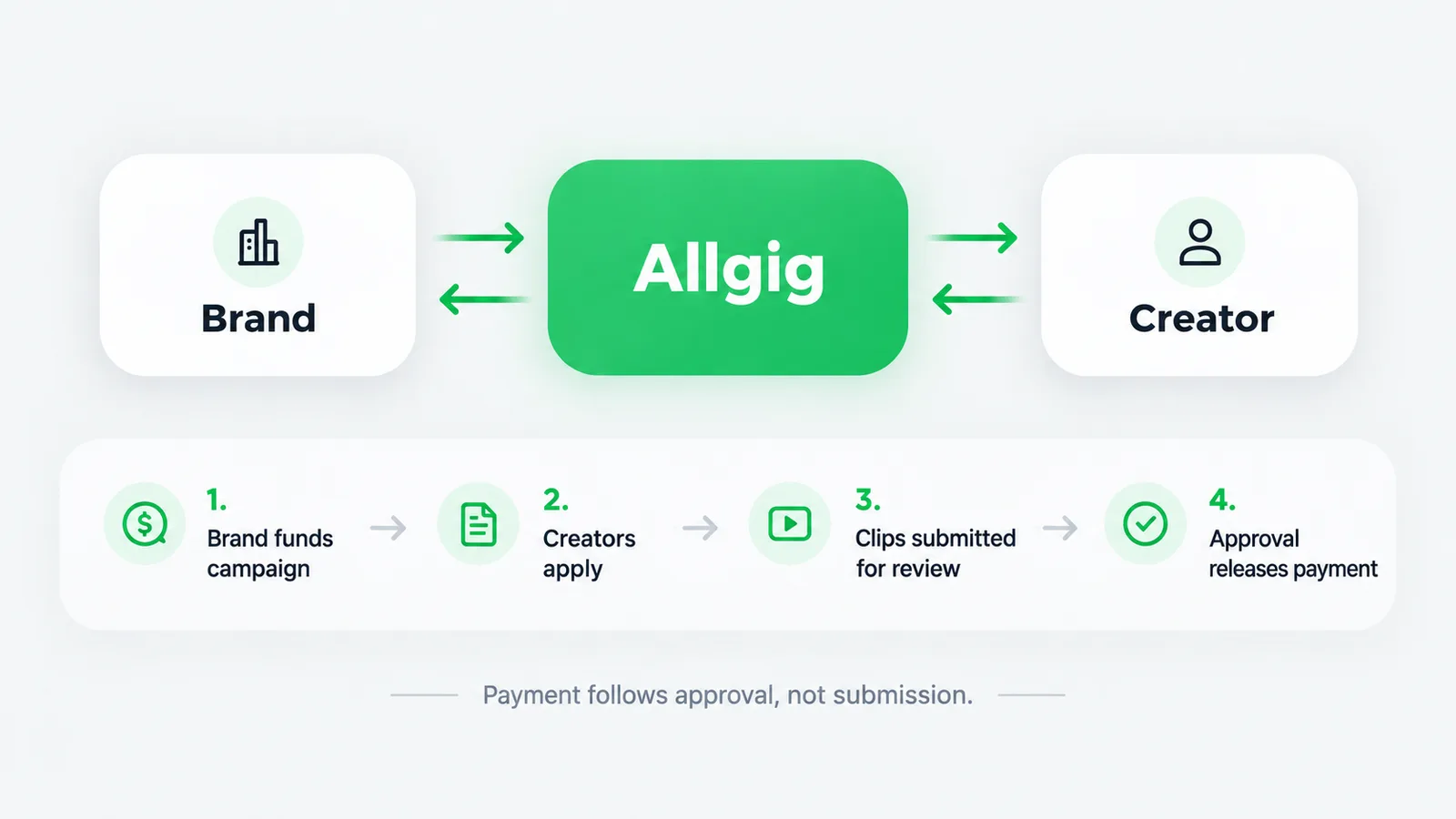
The platform's job is the part neither side wants to handle alone. It publishes the brief, collects applications, holds the campaign budget, receives the finished clips, and releases payment when the work is approved.
On Allgig, that flow runs in a fixed order. A brand funds a campaign before it goes live, so the money is already reserved before any creator applies. Creators apply, the brand selects who it wants, and the work is submitted for review. Approval releases payment to the creator's wallet. Payment follows approval, not submission.
That order is the whole point. It means you are not chasing an invoice after the fact. The budget exists before you start cutting.
What a clipping platform is not
This is where most people get confused, so let us be blunt about it.
A clipping platform is not a video editor. It does not cut your clips for you. Tools like CapCut, Premiere, or DaVinci Resolve do the cutting. The platform handles the work around the cutting: the brief, the approval, the payment.
A clipping platform is not an agency. An agency takes your work, marks it up, and manages the client relationship for you. A platform lets you apply directly to a brand's campaign and keep the relationship yourself.
A clipping platform is not a job board either. A job board lists openings and leaves you to negotiate, invoice, and chase payment on your own. Here, the platform holds the money and the approval step.
And a clipping platform is not an AI clipping tool. Some tools now promise to auto-cut clips from a long video. That is a different product with a different promise. If a page tells you a platform will edit for you, check whether it is selling software or selling work.
How the work actually flows, step by step
Here is the sequence on a funded campaign, in the order it happens.
The brand writes a brief. It states the source video, the number of clips, the length, the platform, and the reward.
The brand funds the campaign. The budget is reserved before the campaign is visible to creators.
You apply. You show what you can do, usually with a sample or a short pitch.
The brand selects creators. Not everyone who applies gets the work, and that is normal.
You cut the clips and submit them for review.
The brand reviews the submission. It approves, or it asks for a change.
Approval releases payment to your wallet.
You withdraw when you are ready. A first withdrawal is reviewed by hand, and larger withdrawals go through the same check.
Notice that step two comes before step three. That is the difference between a funded campaign and a promise.
Why the funded-first model protects you
Most complaints about clip work come down to one thing: the creator did the work and the payment never arrived. The usual cause is that the brand was never committed to paying in the first place. There was no budget, only an intention.
A funded campaign removes that risk at the source. The money is reserved before the campaign goes live, so the question is never whether the brand can pay. It is only whether the work gets approved.
That does not mean every submission is approved. It means the money is real and waiting. If your clip is approved, payment follows. If it is not approved, you know why, and you can fix it or move to the next campaign.
What you need to start clipping
Less than most people think. The barrier is not equipment.
You need a phone or a laptop that can run a basic editor. You need a source video you are allowed to clip, which the campaign provides. An eye for the moment that makes someone stop scrolling helps too. And read the brief properly, because most rejected clips fail on the brief, not the edit.
You do not need a large following. Clipping work is judged on the clip, not on your follower count. A brand cares whether the clip performs, and a good clip from a small account can outperform a weak clip from a large one.
You do not need a professional camera. The source footage already exists. Your job is the cut, the captions, and the pacing.
You do not need to show your face. Plenty of clipping work is faceless by design, because the clip is about the source material, not about you.
Where clipping work comes from
There are three honest sources of clip work, and they are not equal.
Direct outreach is the slowest. You find a podcast or a creator with long-form video, pitch them, and negotiate. It works, but you carry all the risk and all the admin.
Freelance marketplaces are the middle path. You can find editing gigs, but you are usually paid per hour or per project, and payment terms vary wildly.
Funded campaigns are the cleanest. The brief is written, the budget is reserved, and the approval step is defined. You apply, you cut, you submit, and approval releases payment. If you want to see what that looks like in practice, the clipping work on Allgig runs on exactly this model.
Common mistakes that get clips rejected
Most rejections are avoidable, and they repeat.
Ignoring the brief. If it asks for three clips under 30 seconds, four clips at 45 seconds will not pass.
Bad audio. A clip with muffled sound dies in the first second, no matter how good the visual is.
No captions. Most short-form video is watched on mute, so a clip without captions loses most of its audience.
A slow opening. If the hook is not in the first two seconds, the scroll wins.
Wrong aspect ratio. A clip cut for a wide screen looks broken in a vertical feed.
Over-editing. Too many effects, zooms, and sound cues make a clip feel like an advert instead of a moment.
Fix these six and your approval rate changes, because you are now solving the brand's actual problem.
How clipping differs from UGC
People use the two words interchangeably, and they should not.
UGC is content you create for a brand: a product review, an unboxing, a testimonial, a lifestyle shot. You are the subject, and the brand's product is the focus.
Clipping is content you cut from someone else's video. You are the editor, and the source material is the focus. The brand owns the long video, and you turn it into short clips that carry its message further.
Both are paid work on a funded campaign. Both follow the same approval and payment flow. The difference is what you bring: your face and your voice in UGC, your edit and your timing in clipping.
If you are deciding between them, the honest test is simple. Do you enjoy being on camera, or do you enjoy finding the moment in someone else's footage? Pick the one you would do for free, then get paid for it. If you want the other side of the picture, what UGC work involves is worth reading next.
What to look for in a good brief
Once you are on a platform, the brief becomes the most important document in the job. A good one answers everything before you start.
It states the source video, so you know what you are cutting. It states the number of clips, so you know the scope. It states the length range, so you know the shape. It states the platform, so you know the aspect ratio. It states the reward, so you know what approval is worth. And it states the deadline, so you know the pace.
If any of those is missing, ask before you cut. A question costs a minute. A rejected submission costs the whole job.
The tools you actually need
Less than people expect. The source footage already exists, so the camera is not the bottleneck.
An editor that runs on your phone or laptop. Free options are enough for most campaigns.
A caption tool. Several editors include one, and captions matter because most short-form video is watched on mute.
A quiet place to work. Audio quality decides whether a clip holds attention.
An export preset for vertical video. Once set, this saves time on every job.
What you do not need is a professional camera, a studio, or a second monitor. They help at volume, but they do not decide whether your clip is approved. The hook, the clarity, and following the brief decide that.
How clipping differs from editing for hire
These two get confused, so it is worth separating them clearly.
Editing for hire means a client sends you footage and you cut it to their instruction, usually paid by the hour or per project. You are selling time.
Clipping on a campaign means you cut clips from a source a brand provides and submit them for approval, paid per campaign. You are selling a defined deliverable.
Both are legitimate. The campaign route usually suits creators who want a stated reward and a clear finish line, because both are written down before you start.
What happens after your first approved clip
The first approval changes how you approach the work, because you now know the mechanism is real.
Payment lands in your wallet. Withdrawal is a separate step, and a first withdrawal is reviewed by hand. Once that clears, the whole process stops being abstract.
From there the path is repetition. Apply, cut, submit, get approved, get paid. Each round makes the next one easier, because your record grows and brands begin to recognise your name. That is the whole arc, and it is slower and more real than the promises.
How much time a clipping job takes
This is the question people ask before they apply, and the honest answer depends on the source.
Watching the source takes the longest. A one-hour podcast needs an hour to review properly, because the moments worth clipping are rarely in the first five minutes. The cutting itself is faster once you know which moment you want.
A set of three clips usually takes two to four hours in total, spread across a day or two. That includes the review, the cuts, the captions, and the export. It is a real amount of work, and it is why a clipping platform states a reward rather than an hourly rate.
The time drops as you build a workflow. Your export settings become automatic, your caption template is ready, and your eye finds the moment faster. By your tenth job, the same set takes half the time it did on your second.
Why some clips get approved first time
An approved clip usually shares a few qualities, and they are worth aiming for deliberately.
It opens on the moment rather than the setup. It keeps the context minimal, so a viewer who never saw the source still understands it. It has clean audio and accurate captions. It matches the length and the platform the brief asked for. And it ends while the moment is still landing.
None of that is mysterious. It is a checklist, and running it before you submit is the difference between a rejected clip and an approved one.
What happens when a clip is not approved
Rejection is normal, and it is information rather than a verdict.
You get the reason, and you can fix it or move on. The campaign budget stays reserved for approved work, so an unapproved clip does not cost you money you were never owed.
Most rejections come down to the brief rather than the edit. The length was wrong, the platform was wrong, the point was missing, or the audio was too quiet. Each of those is fixable, and the fixed version is often approved on resubmission.
Frequently asked questions
Is a clipping platform the same as a video editor?
No. A video editor is the software you cut with. A clipping platform is where the work, the brief, and the payment live. You use an editor to do the job and a platform to get the job and get paid for it.
Do I need followers to get clipping work?
No. Clipping work is judged on the clip you submit, not on your audience size. A brand wants a clip that performs, and that is a craft question, not a popularity one.
How do I know I will get paid?
On a funded campaign, the brand reserves the budget before the campaign goes live. Approval releases payment to your wallet, and withdrawals are a separate step. The money is committed before you start cutting.
Can I clip any video I want?
No. You clip the source material a campaign provides, and you follow the brief. Clipping a video you do not have the right to use is a copyright problem, not a shortcut. YouTube's own guide to copyright on YouTube explains who owns a video and why permission matters.
Is clipping work only for experienced editors?
No. The brief tells you what is needed, and most campaigns ask for clean cuts, captions, and a strong opening. If you can follow instructions and find the moment, you can start.
What happens if my clip is not approved?
You get the reason, and you can fix it or move on. The campaign budget stays reserved for approved work, so an unapproved clip does not cost you money you were never owed.
One clip is enough to find out
You do not need a plan, a portfolio, or a following to test whether this work suits you. You need one long video and twenty minutes.
Cut three clips from it. Watch them back on mute. If they still hold your attention, you already have the instinct the job requires, and the rest is practice. If they do not, you have found the exact skill to work on, which is more useful than a vague ambition.
When you are ready to see how a real brief is written, the clipping work on Allgig shows the reward and the deliverable before you apply. Read one end to end and notice how much of the job is decided before you ever open an editor. And if the money terms are still unclear, the Allgig learning library explains them in plain language. If you want to know where paid clip work actually comes from, clipping jobs breaks down the routes in, clipping platforms that pay covers what to check first, and how clip campaigns pay out explains the money side.